Ailo
Ailo
Prototype
Personal AI Agent Platform
UX Research
Agent Design & Interaction Flow
System Design Thinking
Visual & Dashboard UI Prototyping
AI Workflow Design
Logic Mapping
At a Glance
Project Summary
Built a full-stack UX system for designing intelligent, personalized AI agents reactive and proactive. Users define purpose, avatars, logic flows, and permissions while training agents with multimodal inputs. Features include real-time APIs, proactive behavior modules, and a visual dashboard for live analytics.

Prototype
Project Summary
Built a full-stack UX system for designing intelligent, personalized AI agents, reactive and proactive.
Users define purpose, avatars, logic flows, and permissions while training agents with multimodal inputs (text, voice, triggers). Features include real-time APIs, proactive behavior modules, and a visual dashboard for live analytics.
Process
Discover
Define
Explore
Design
Prototype
Benchmark

Reimagining AI for Real Life
Most AI tools today help in the moment — but forget your goals, context, and progress.
What if AI could grow with you?
Remember your tasks. Adapt to your routine. Support your learning.


It wasn’t about designing another assistant.
It was about designing a relationship — one where intelligence grows over time, adapts to your goals, and fits your life like a second brain.
Research & Discovery
What people really need from AI isn’t more answers — it’s continuity.
Instead of formal surveys, I spoke casually with classmates, designers, and developers. Regardless of experience, most felt AI was present — but not truly supportive.


As someone already exploring the world of AI tools, I began asking friends around me:
“How do you use AI in your daily life?”
“What slows you down when managing personal projects or learning?”
“Would you trust an AI to help you with that?”
Key Insights from Conversations

No Task Memory
“I use ChatGPT a lot… but it forgets everything. I wish it knew what I was working on last week.”
Different Domains, Same Fragmentation
“I do crypto research, but also run a study routine. I need different setups — not one generic assistant.”
Too Many Disconnected Tools
“I have reminders in Google Calendar, learning stuff in Notion, and ideas in my head… nothing’s in one place.”

Low Trust, High Expectation
“AI is cool, but I want it to nudge me — not just answer and vanish.”
Personas & Problem Framing
Different People, Same Struggle

Despite varied goals, everyone faced similar friction: time, focus, and follow-through.
It wasn’t just a tech gap — it was a behavioral one.

This led to three key personas around personal productivity.

The Ambitious Learner
“I start learning... but lose track or motivation.”
Goals: Build focus, reduce procrastination, develop habits
Pain Points: Easily distracted, no clear progress
Needs: A system with reminders, structure, and visible growth

The Crypto Enthusiast
“I check everything… but it wastes time.”
Goals: Stay informed, act fast, cut distractions
Pain Points: Info overload, scattered platforms
Needs: A focused, filtered, and summarized view of key insights

The Overloaded Techie
“I use every tool — and still feel overwhelmed.”
Goals: Manage tasks, stay clear-headed, avoid burnout
Pain Points: App fatigue, nonstop switching, mental load
Needs: A mindful system to prioritize, schedule, and support well-being
Users need systems that adapt, remember, and support real-life workflows.
Grounding Myself in the Basics
Before designing, I stepped back to understand how AI chatbots actually function — not just from a user’s view, but from the backend.
I explored how they process input, match patterns, and respond — all without memory or personalization.
This foundation shaped how I approached the broader problem.

So How Do AI Chatbots Actually Work?
At a basic level, AI chatbots like ChatGPT use a process called natural language processing. When you give a prompt, the model:

Key Literature That Guided Me
1. Human-Centered AI – Ben Shneiderman (2020)
“Designs require transparency, accountability, and a deep respect for user agency.”
This helped me realize AI isn’t just about performance — it’s about how users experience it.
3. Designing Agentive Technology – Christopher Noessel (2017)
Outlined the difference between tools that wait for input and systems that take initiative. While I wasn't designing agents yet, this gave me early clues into what was missing from chatbot UX
Ideation: Rethinking What AI Could Be
From Understanding to Imagining
After learning how AI works and why users struggle, I explored what it would take to make AI truly personal — using sketches, thought experiments, and feature audits.


This phase wasn’t about features — it was about possibilities. I explored how AI could move beyond chatbots to become a trusted daily co-pilot.

Defining the Concept: From Ideas to Core Structure
I translated ideas into system-level solutions — building a personal, organized, and intelligent structure to support daily life.
TimeSense was a proactive scheduling agent I built early on. While it handled time management well, it didn’t address the deeper issue of fragmented, context-less tools. That limitation led me to envision a broader, multi-agent system

StudyBuddy was a task-suggestion AI for students, built using the ChatGPT API. It supported focus and planning — but like TimeSense, it solved only a narrow need. It confirmed the value of proactive AI, while revealing the need for a more flexible, multi-domain system
Early Experiments → Bigger Realization
Building TimeSense and StudyBuddy proved proactive AI works — but only in silos. Users needed something broader. That’s when the idea of a unified AI system emerged — one that’s modular, proactive, and personal.

Concept 1: Personal AI Agents
I explored modular AI agents trained for specific domains (like scheduling, research, or finance), inspired by how businesses use internal tools. But what if individuals could do the same?
Users didn’t want another chatbot — they wanted smart assistants with memory, roles, and purpose. This addressed key needs:
– Specialization over general answers
– Less tool-switching
– Assigning tasks, not just giving prompts

Concept 2: Proactive AI
Most AI tools wait for input — I explored how AI could take initiative.
What if it reminded you, suggested next steps, or nudged you gently when off track?
Users didn’t want just answers — they needed a calm, consistent push to stay focused.
Proactive AI could act like a supportive coach — not loud, just present.

Concept 3: A Unified, Multi-Agent System
Instead of one chatbot, I imagined a platform with multiple personal agents — each handling a domain like Research or Study.
They’d work together under one dashboard, learning user behavior and nudging proactively.
A complete, connected system — not just smart answers, but a supportive AI team.
Validating My Concepts Against Existing Tools
After defining the three core ideas — personalization, proactiveness, and modular agents — I examined existing tools to see how well they delivered on these principles.
General AI Platforms – How current tools like ChatGPT, Replika, and Notion AI handle productivity and personalization

Agent Creation Platforms – How emerging systems like Make.com, Zapier AI, Agent.so, and LangChain support agent behavior and automation


What I Learned
Most tools are either too narrow or too technical. While agent-like behavior exists, it's limited to business or developer tools — none are personal, goal-driven, or visually transparent for everyday users.

From Pieces to Platform
What began as separate ideas — memory, scheduling, learning — came together as one clear vision:
A personal AI ecosystem to manage focus, tasks, and knowledge in one place.
That’s when AILO was born — a human-centered AI that understands, remembers, and evolves with you.
Design Process
With the system direction in place, I translated the idea of personal AI agents into tangible structures — from hand-drawn sketches to architecture and UI.


Typical AI Agent Backend

System Structure Design
Laying the foundation for how agents and dashboards communicate and operate within

Information Architecture
Organizing screens, flows, and content to support modular agents and a seamless user experience.

Core Feature Highlights
Before diving into wireframes, here’s a quick look at the core features — built to balance control, clarity, and intelligent assistance.

1. Unified Dashboard
Shows all active agents and their current tasks
Displays daily goals, suggestions, and upcoming events
Highlights notifications and proactive automations
Offers smart nudges to improve productivity and time management
Each agent’s card includes activity insights and engagement logs
A floating action button lets users chat directly with any agent — not to re-train it, but to collaborate in real time
2. Agent Interaction Panel
Each agent has a dedicated space showing:
Avatar, name, and role
Chatbox for natural interaction or assigning tasks
Summaries, recent activity, and upcoming events
Users can pause, delete, or update agent behavior from here

3. Agent Setup & Training Flow
Step 1: Define the agent
Choose avatar, name, tone, and goal
Lightly train the agent using text or voice input, or let AI assist
Step 2: (Optional) Build Logic
Create task flows using visual logic: Trigger → Condition → Action → Delay
For advanced control, users can define multi-step interactions
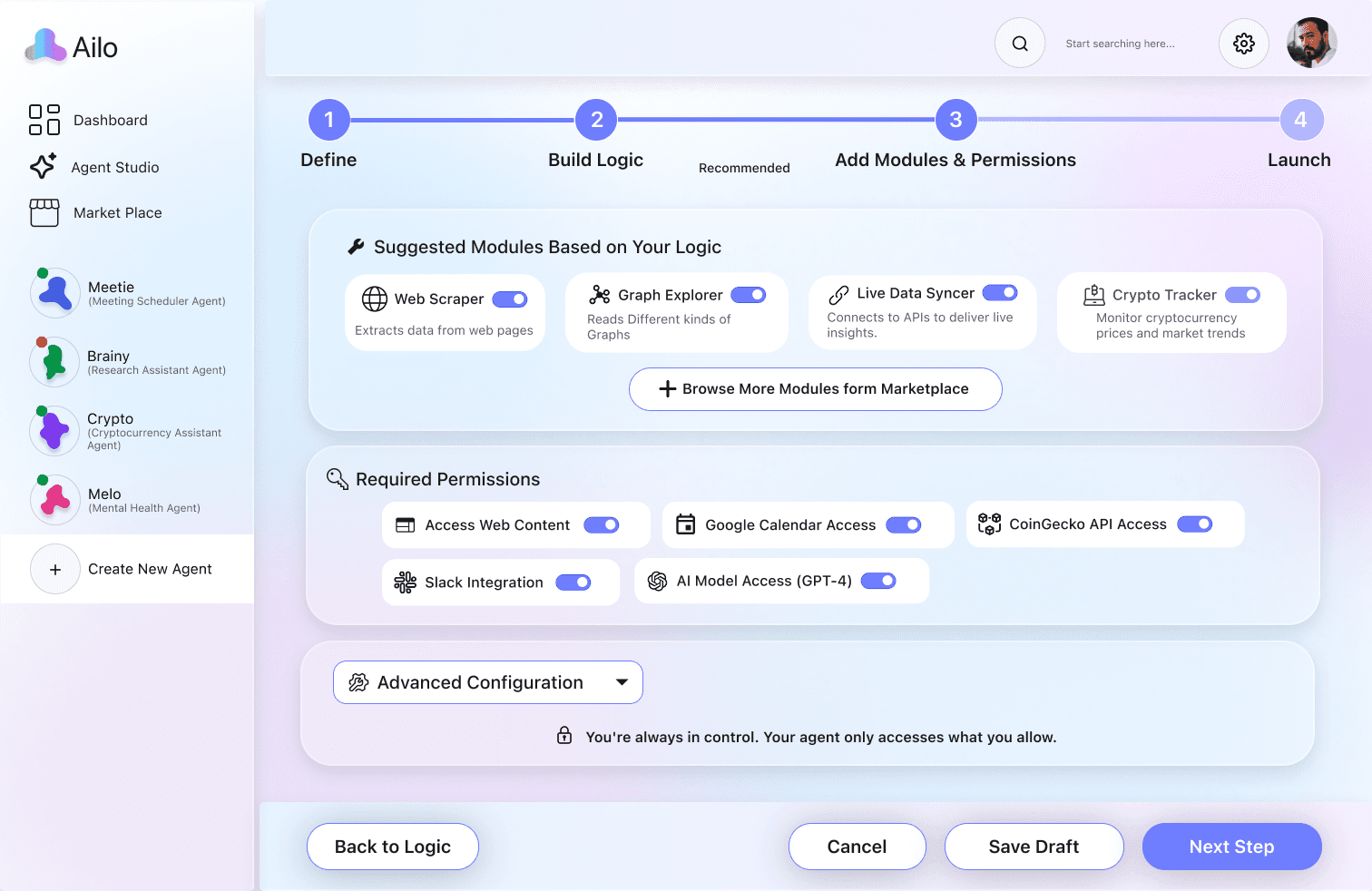
Step 3: Configure Modules & Permissions
AILO suggests relevant modules based on the agent’s intent
Users can allow access (e.g. Calendar, Mail, Notes)
Fine-tune privacy, access scope, and automation behaviors

✨ Naming AILO
Design System
Interaction Design
User Flow
Logo Design
Color Palette
AILO blends “AI” (Artificial Intelligence) with “lo” — a soft, affectionate suffix evoking warmth, like a close companion.
“Lo” hints at hello, human connection, and emotional presence — making AILO feel not just intelligent, but personal and supportive.
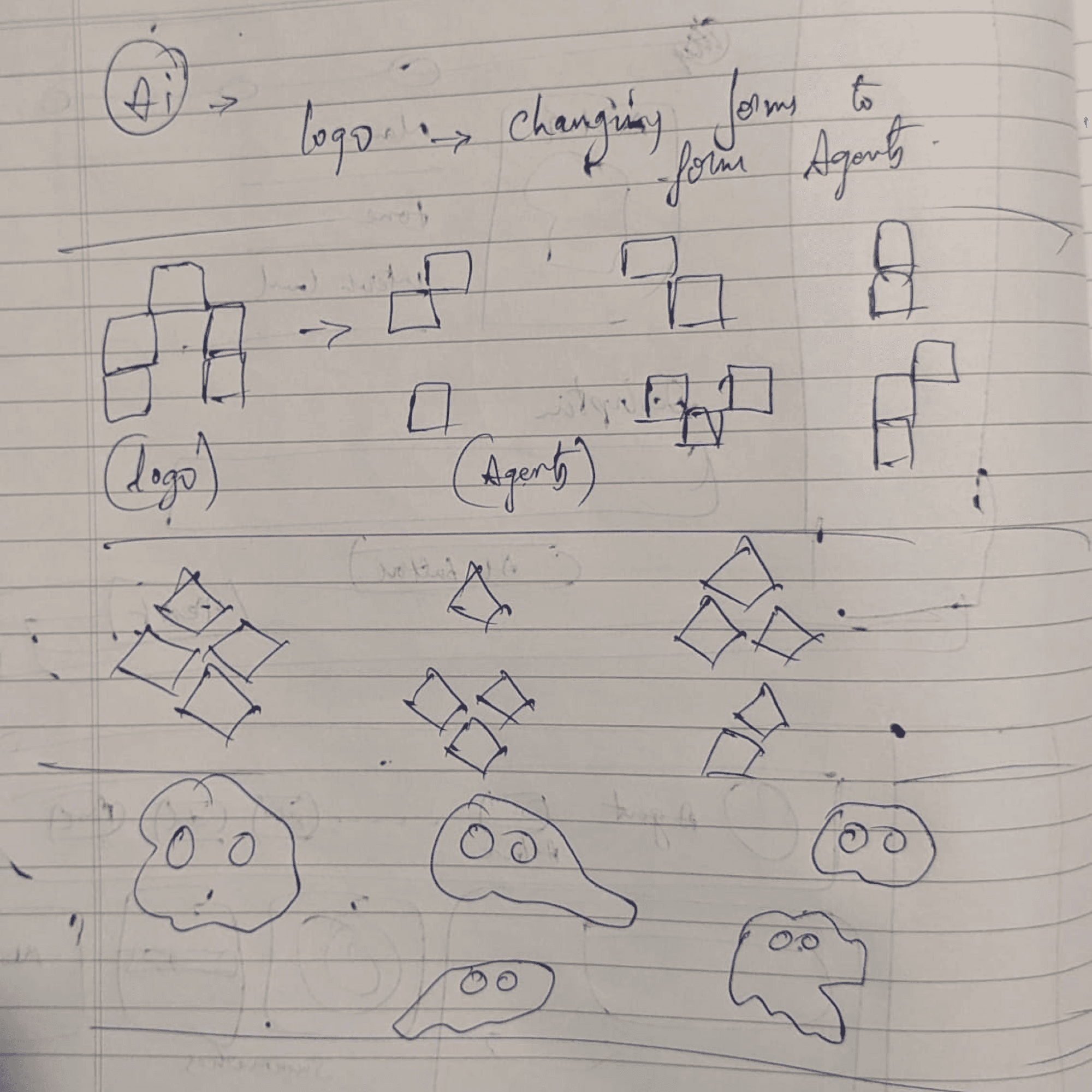
The AILO logo was envisioned not just as a brand mark, but as a foundation for agent identity and adaptability.
I explored visual systems that could represent:
This led to an amoeba-inspired design — soft, shape-shifting, and alive. Its abstract form hints at a system that is not rigid, but ever-learning, ever-morphing, and deeply personal.
AILO’s color system is designed to feel intelligent, calm, and emotionally present. Inspired by modern AI tools and digital well-being platforms, each color supports a balance between functionality and friendliness.
These three create a flowing, ambient background that aligns with the AILO logo and avatars — keeping the experience light, inclusive, and emotionally neutral.
Primary Font: SF Pro
Why SF Pro?
Offers excellent readability across sizes
Feels clean, human, and contemporary — aligning with AILO’s friendly yet intelligent brand
Chosen to highlight actions clearly without aggressive contrast.
A standout action button that triggers AILO’s intelligent features like auto-setup and logic suggestions.
Gradient: AILO’s signature gradient (blue → purple → pink → peach) — reinforces brand identity
Icon: ✨ Sparkle icon — signals smart, AI-powered interaction
Sky Blue, #D0EAFFL, eft-side background base, Evokes clarity, digital freshness, and mental space
Lavender Pink, #F0DDFF, Center gradient blend, Adds warmth and softness, avoiding clinical AI tones
Muted Purple, #EBE0F7, Right-side gradient blend, Grounds the interface with calm neutrality and depth
Indigo Blue, #6F7DFF, Buttons, links, emphasis, Strong but soft; balances trust and modern tech appeal
Primary Text, #1C1D1F, Headings, bold content, High legibility, strong information anchor
SF Pro, All text (headings, body, UI)A modern, neutral, highly legible typeface — widely used in Apple and AI-based UI systems. Balances clarity with familiarity.
ndigo Blue, #6F7DFF, Highlighted text, inline links, emphasis labels, Draws attention subtly without breaking visual harmony
Secondary Text, #3F3F3F, Body copy, labels, Supports hierarchy while staying subtle
Tertiary Text, #5E5E6F, Timestamps, helpers, Low emphasis info without visual clutter
The form reflects both futurism and humanity — not sharp and robotic, but adaptive and approachable.
Background Gradient System
Primary Action Color
✨ “Create with AI” Button
Text Color System (Neutrals)
Accent Text
Typography
“AI brings the brains, lo brings the bond.”

Let AI Suggest Logic

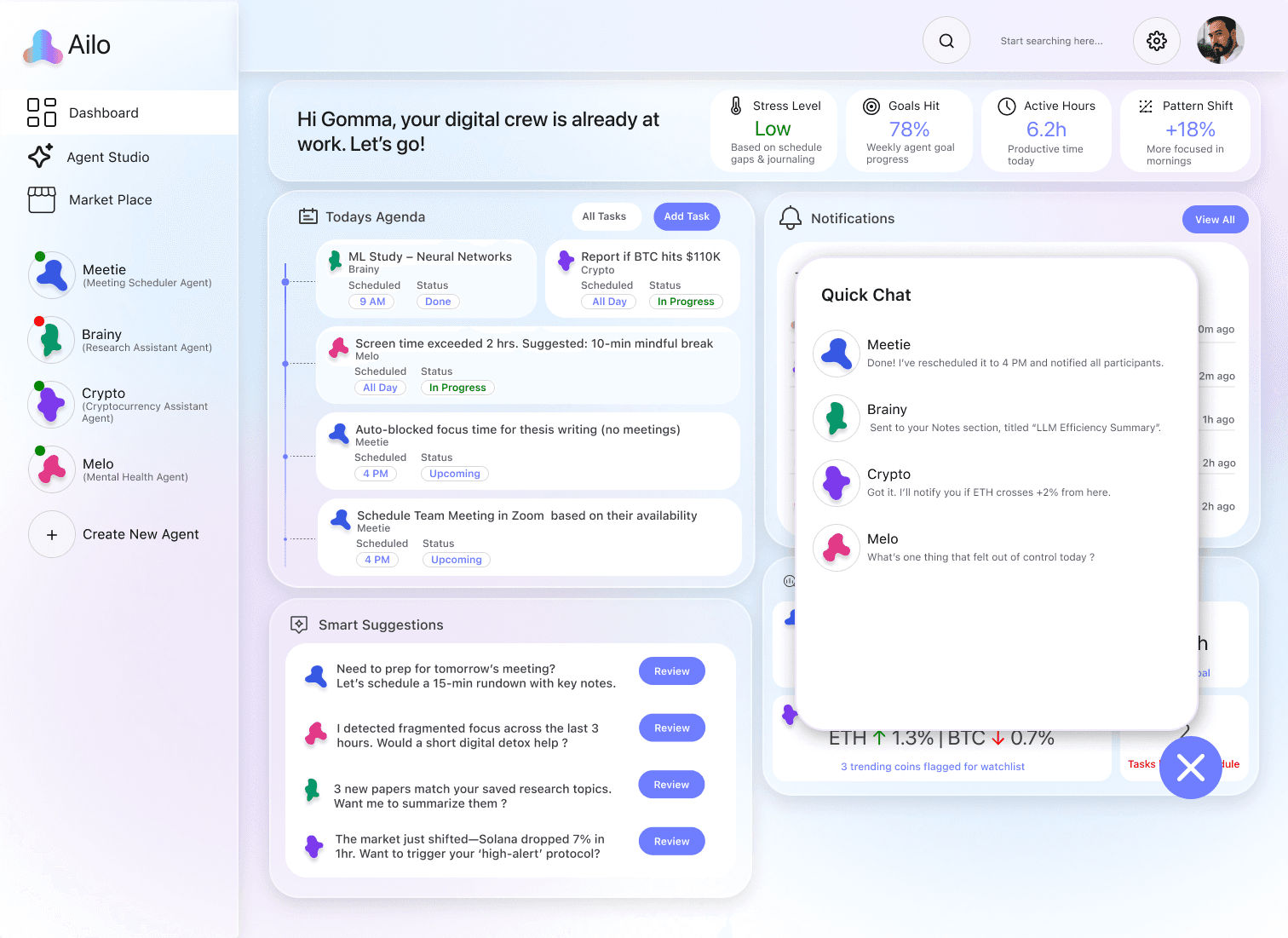
Add Task: Opens AI task suggestions.
All Tasks: Smooth view switch.
Smart Suggestions: Cards fade in; “Review” pulses.
Review Button: Shows task info inline.
Notifications: Slide in; old ones fade.
View All: Opens full list.
Agent Insights: Bounce in; hover shows tips.
FAB: Pulses; opens quick chat/actions.
Agent Header: Status pulses; hover glows.
Action Buttons: Tap highlights with icon shift.
Chat Box: Supports voice, files, tools; smooth input fade.
Replies: Typewriter effect; suggestions slide in.
Stats: Radial fill + number count-up.
Tasks: Cards pop in with color tags.
Activity Log: Entries fade in top-down with timestamps.
Inspired by common AI chat UIs — supports voice input, file upload, and smart tools with minimal, smooth interactions. Replies animate in with a typewriter effect and quick follow-up suggestions.
Data is visualized through animated graphs and count-ups for quick understanding. Layout and colors are designed to make agent progress feel clear, trackable, and rewarding.
Progress Bar: Highlights active step with soft glow.
Avatar Shuffle: Tap rotates avatar randomly.
Form Inputs: Name, tone, and interaction level dropdowns animate on open.
AI Write Button: Glows on hover; suggests improved description and trains agent based on user input.
Add Logic: Highlights on hover; click animates transition to builder.
Skip This Step: Subtle shake on hover, moves user to next step.
Logic Nodes: Drag-and-drop blocks snap into flow paths.
Library Panel: Icons glow on hover; tap adds block to canvas.
Connections: Lines animate in as nodes link.
AI Suggest Logic: Triggers auto-generated flow based on task context.
Next/Cancel/Save: Slide effects on tap for smooth step transitions.
Logic Diagram: Users connect trigger, condition, action, and delay blocks in a visual flow—like a decision tree—to define how the agent behaves over time.
Suggested Modules: Auto-generated from user’s logic; toggles enable smart capabilities.
Permissions: User approves each integration; ensures transparency and control.
Advanced Config: Expandable section for power users to fine-tune access and behavior.
Flow Control: “Back to Logic” lets users iterate without losing progress.
Meetie
Done! I’ve rescheduled it to 4 PM and notified all participants.
Brainy
Sent to your Notes section, titled “LLM Efficiency Summary”.
Crypto
Got it. I’ll notify you if ETH crosses +2% from here.
Melo
What’s one thing that felt out of control today ?
Quick Chat


Build Logic (Optional)
Add rules that help your agent act automatically based on triggers and conditions. If you're building a reactive or tool-based agent, you can skip this step.
Add Logic
Skip This Step

CoinDCX Graph Update
If BTC drops by EOD < 1.3%
Report BTC Drop
After 1 Hr
Report Wallet balance
Infinite combinations (to reflect modular agent creation)
Organic evolution (as agents adapt and grow)
A sense of fluid intelligence (aligning with AI’s dynamic nature)
Of course! 🧠
The most recent papers focus on optimizing transformer efficiency through sparse attention mechanisms and modular training. One key highlight: “MoE-Fusion” architecture reduces compute by 35% while maintaining accuracy. Want me to drop the top 3 papers?
Currently, I'm:
• Collecting 5 new papers on AI in Education 🧾
• Summarizing your saved article on multi-modal LLMs 📄
• Tracking Reddit threads related to open-source embeddings 💬
Would you like to prioritize one of these or add a new research thread?
Hey Brainy, can you summarize the latest research on transformer models?
What are you working on for me right now?
Time Saved
7.2h
↑ 9% vs last week
↑ 12% vs last week
48 / 50
Documents Parsed
Library
Trigger
Condition
Action
Delay

See more of my work


Ailo
Prototype
Personal AI Agent Platform
Project Summary
Built a full-stack UX system for designing intelligent, personalized AI agents reactive and proactive. Users define purpose, avatars, logic flows, and permissions while training agents with multimodal inputs. Features include real-time APIs, proactive behavior modules, and a visual dashboard for live analytics.

See more of my work
Smart Triage
Mayo Clinic
Healthcare UX, AI Decision Support, CX Research
AI triage workspace for faster referral decisions.
Built a unified clinical workspace that helps clinicians review referrals faster, safer, and with clearer context.
40% Faster , 12–18 Min Saved, 3× Faster Flagging
Homie.AI
Venture Build
AI Product Design, Learning UX
Real-time visual AI guidance for learning complex tools.
Designed a screen-aware learning assistant that reduces tutorial switching by bringing step-by-step, visual help directly into the user’s workflow.
Uni-Verse
Engagement
Engagement UX, Behavioral Design, UI Systems
Helping students find people, events, and belonging.
Designed a campus companion that connects students through Tag-Along, communities, live events, and real-time activity maps.
Best UX/UI Design Award · ASU GIT Fall 2025
