SMART HEMATOLOGY TRIAGE SYSTEM

Mayo Clinic
ROLE
CX Designer · UX Researcher · Human-AI Interaction
TIMELINE
16 Weeks, Fall 2025
TEAM
5-person team
SCOPE
AI product strategy · research · prototyping · validation
TOOLS
Figma · Miro · Figma Make
ROLE
CX Designer · UX Researcher · Human-AI Interaction
TIMELINE
16 Weeks, Fall 2025
TEAM
5-person team
SCOPE
AI product strategy · research · prototyping · validation
TOOLS
Figma · Miro · Figma Make
At a Glance
In a hematology care setting filled with complex referrals and scattered patient data, Smart Hematology Triage helps nurses see the most important patient information in one place. By highlighting key clinical signals, it reduces the time spent searching through records by 40% and supports faster, safer triage decisions while keeping nurses in control.
Prolem
Healthcare loses $90B+ annually to administrative inefficiencies, while hematology triage nurses can spend an estimated 4–6 hours per shift managing high-volume referrals across fragmented EHR, lab, and imaging systems. In a specialty where delays can postpone cancer diagnosis by weeks, Smart Hematology Triage targets this fragmentation to support faster, safer high-stakes decisions.
Quantified reality
20-30%
Time spent searching, not deciding
~45%
Referrals arrive incomplete
12-18 min
Lost per referral to data hunting
50-60%+
Nurse burnout linked to workload
Solution
Smart Hematology Triage brings scattered patient data into one clear view, using AI summaries, risk flags, and clinician co-design to reduce search time and support faster triage while keeping every decision in clinicians’ control.
• Co-designed for real triage workflows
• AI summaries + risk flags
• Unified EHR, lab, and imaging view
• AI suggests, clinicians decide
At a Glance
In a hematology care setting filled with complex referrals and scattered patient data, Smart Hematology Triage helps nurses see the most important patient information in one place. By highlighting key clinical signals, it reduces the time spent searching through records by 40% and supports faster, safer triage decisions while keeping nurses in control.
Prolem
Healthcare loses $90B+ annually to administrative inefficiencies, while hematology triage nurses can spend an estimated 4–6 hours per shift managing high-volume referrals across fragmented EHR, lab, and imaging systems. In a specialty where delays can postpone cancer diagnosis by weeks, Smart Hematology Triage targets this fragmentation to support faster, safer high-stakes decisions.
Quantified reality
20-30%
Time spent searching, not deciding
~45%
Referrals arrive incomplete
12-18 min
Lost per referral to data hunting
50-60%+
Nurse burnout linked to workload
Solution
Smart Hematology Triage is a human-centered, AI-assisted tool that brings fragmented patient data into one view. Built through clinician co-design, it reduces search time, summarizes key information, flags risk, and supports faster triage while keeping every decision in clinicians’ hands.
• Co-designed with clinicians to match real triage workflows
• AI summaries and risk flags to reduce cognitive load
• Unified patient view across EHR, labs, and imaging
• Clinician-controlled decisions where AI suggests, humans decide
Design Process
Research
Synthesis
Ideation
Design
Final Design
Reflection
01.Research
The Triage Burden:
Understanding Referral Workload, Time Pressure, and Clinical Risk
“I’m trained to make clinical decisions, but most days I’m just trying to keep up with referrals.”
Hematology Triage Nurse
We worked with 6+ hematology physicians and triage nurses through workflow observation, interviews, and surveys to understand how referral decisions happen under real clinical pressure. The research showed that the challenge was not lack of expertise, but sustained cognitive load: nurses process back-to-back referrals for hours, balancing speed, accuracy, and safety while trying not to miss critical clinical signals.
Qualitative Research
"By the time I'm ready to make a decision, I'm already mentally exhausted."
— Hematology Triage Nurse
"I want to think clinically, but most of my time is spent just getting to a point where I can."
— Hematology Triage Nurse
Observation and interviews showed that nurses often reach clinical reasoning only after navigating scattered records. In hematology triage, one missed signal could delay diagnosis or affect patient outcomes.
78%
of nurses described triage as mentally exhausting before clinical judgment begins
72%
reported high anxiety about missing critical information during referral review
67%
said decision confidence drops significantly later in long shifts
83%
expressed the need for clear, visual patient summaries before deciding
Quantitative Research
Surveys validated our interview findings, showing triage workflow inefficiencies around time, usability, and decision confidence. Clinicians wanted AI support, but only if it stayed transparent and kept them in control.
60–70%
of triage time is spent reviewing and assembling referral context not deciding
3–5 systems
accessed on average per referral during triage
82%
reported that contextual & visual patient timelines & EHR would significantly reduce triage effort
100%
agreed that AI must support, not approve clinical decisions
02.Synthesis
How might we save clinical time by designing a triage system that is fast, trusted, and easy to use?
What emerged was not clinical complexity, but fragmented systems. Clinicians were losing critical time across notes, labs, and history, showing the need for transparent AI support that brings context together while keeping decisions in their control.
Time Is the Bottleneck
Clinicians lose critical time searching across records before they can make triage decisions. The design needed to reduce navigation and bring key patient context into one place.
Accountable AI Support
AI should assist, not decide. Clinicians needed clear summaries, visible supporting data, and easy control over every AI suggestion.
A System, Not Just a Tool
Triage depends on labs, notes, timelines, and handoffs. Clinicians needed a connected workflow that organizes information around decisions, not scattered screens.
Personas

Hematology Triage Nurse
Handles first-pass triage for incoming referrals and determines urgency under time pressure.
"I spend most of my time finding labs and notes before I can even start thinking through the case."
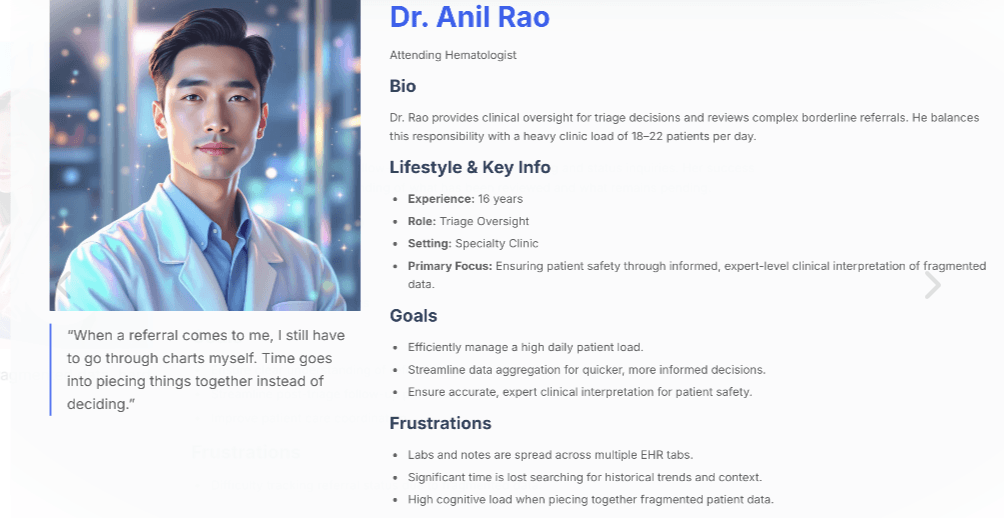
Attending Hematologist
Reviews complex referrals while balancing clinic responsibilities and limited time.
"A lot of my time goes into piecing together charts instead of making the actual decision."
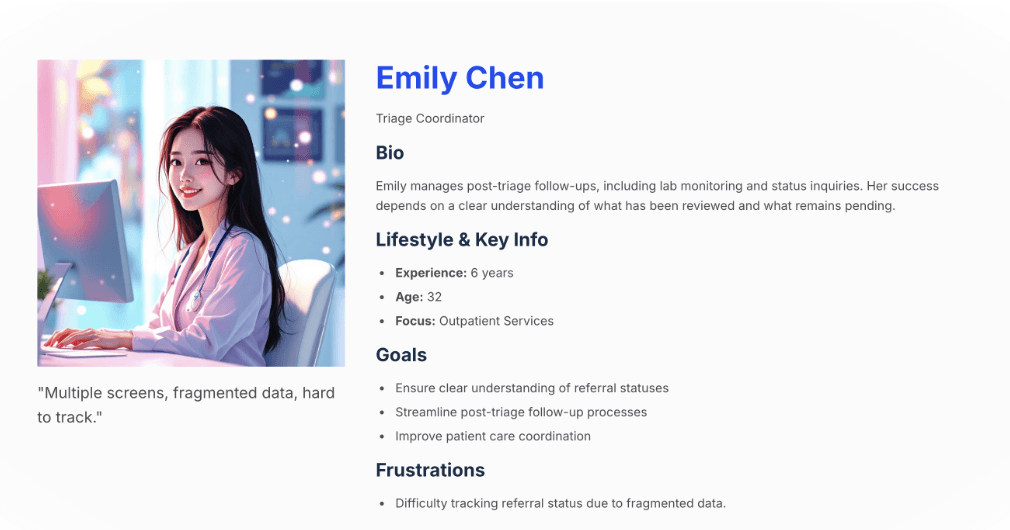
Triage Coordinator
Tracks referral status, lab completion, and follow-ups across patients and providers.
"The information is in the EHR, but I have to jump across tabs and reports to understand what's going on."
User Flow
The user flow reduces search effort by bringing referrals, labs, history, and timelines into one clear triage sequence.

03.Ideation


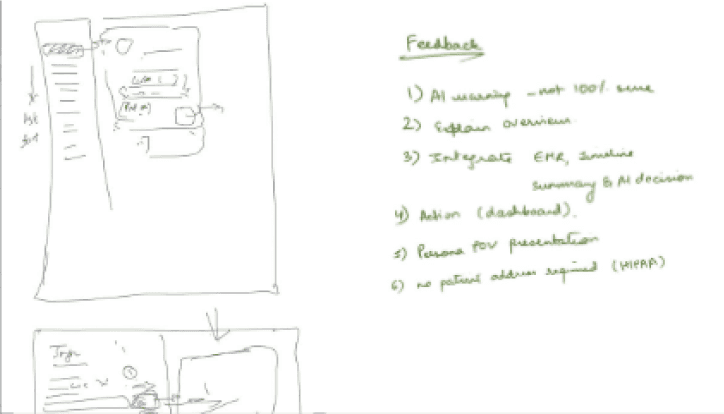


Using affinity mapping, concept mapping, and clinician discussions, I explored ways to reduce triage time while keeping decisions efficient and clinically sound.
Initial Concepts
• AI-assisted triage with priority and risk indicators
• AI summaries highlighting key referral findings
• Visual EHR data and patient timelines
These concepts focused on improving speed and clarity by organizing information around real hematology triage workflows.
04.Design
The design focused on reducing referral review time by organizing key triage signals into one clear view.
It centered on AI priority predictions, transparent decision factors, and visual timelines to help nurses understand context faster.
Branding and Style guide
High-fidelity screens focused on reducing cognitive load by bringing labs, referrals, history, and documentation into one clear triage workflow.

Initial Design
Dashboard

Triage Overview

Decision Flow

Timeline

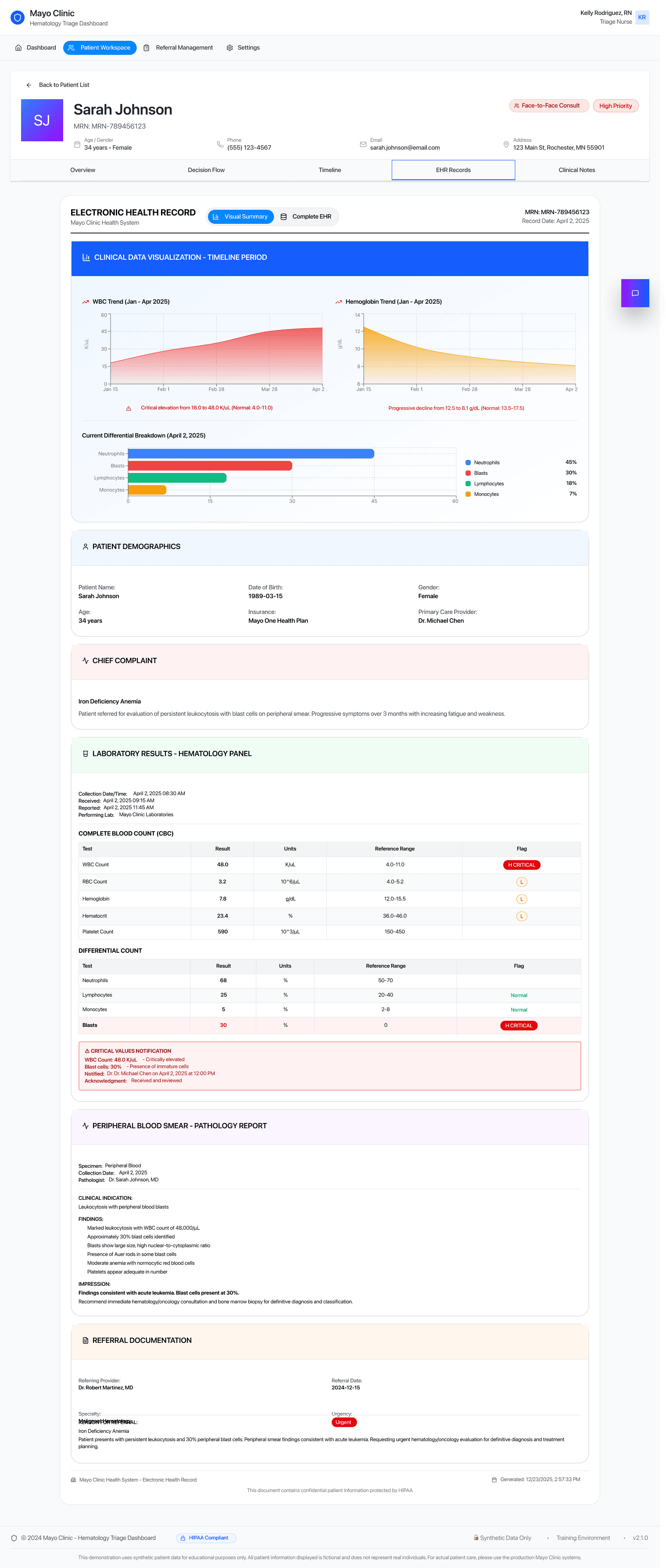
EHR
Clinical Notes

User Testing
The initial testing consisted of 5 doctors and the ML researcher at Mayo Clinic.
Through observed usage, think-aloud walkthroughs, and post-testing interviews, key gaps in the triage flow surfaced, guiding improvements to clarity and efficiency in first-pass triage.
Triage Overview Density
The overview worked well for familiar users, but first-time users needed a simpler first view to focus faster.
Workflow Order
Clinicians naturally moved between related sections, showing the need to combine steps into one smoother flow.
Familiar Clinical Visuals
Charts already used in practice helped clinicians orient faster and reduced the learning curve.
Integrated Documentation
Adding notes within the triage overview supported more continuous, in-context decision-making.
05.Final Design


Quick Patient Contact
Allows direct communication from the patient card with messages automatically recorded in the same thread for continuity and reference.

Login & Access
A clean, secure entry point enables clinicians to access the triage system quickly with minimal friction.
Triage Dashboard & Referral Queue
Centralized view of incoming referrals with status, priority, and last action at a glance.
Global search and filters support quick sorting and first-pass triage.
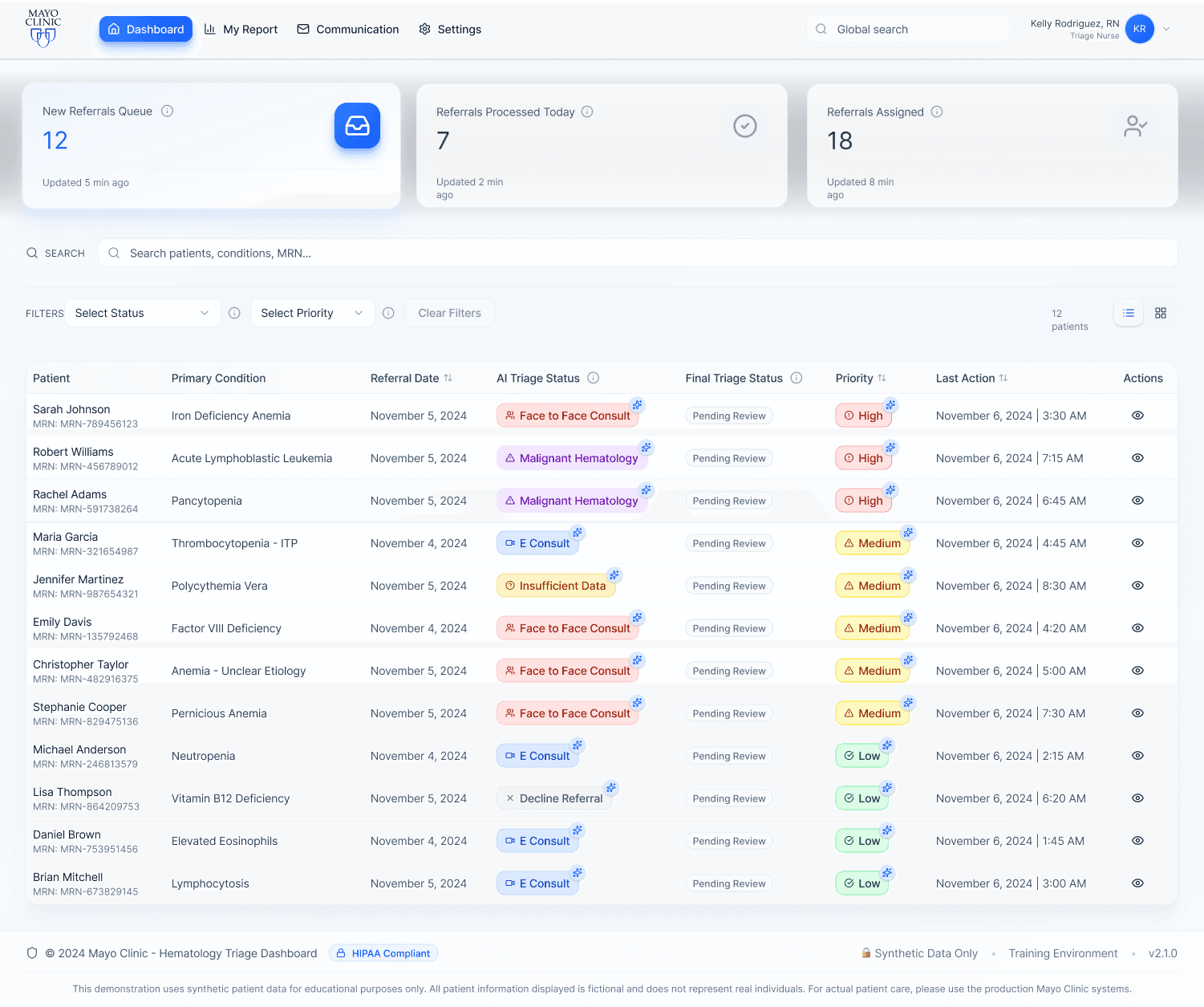


Contextual Tooltips
Used to explain key components, support different levels of technical familiarity, and improve accessibility without adding clutter.

Triage Overview & Decision Workspace
Primary workspace for reviewing patient context and making triage decisions.
Allows clinicians to accept or modify AI-assisted triage recommendations.
Keeps key clinical information visible to support quick, informed decisions.
Triage Actions - 4 Simple steps


Clinical Triage Guide -
Provides three quick-access views that allow clinicians to make fast triage decisions when detailed review is not required, supporting efficient first-pass triage.
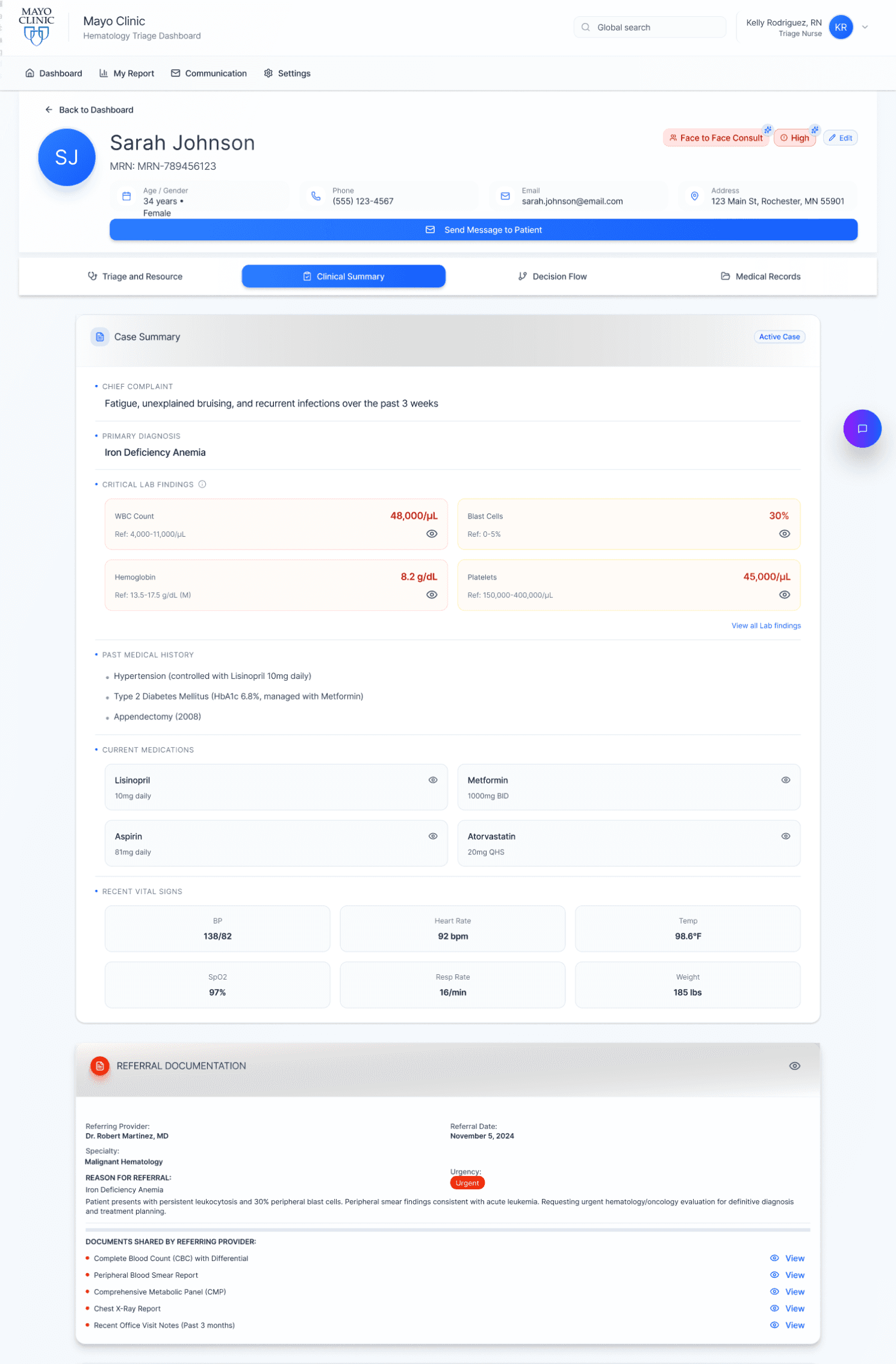
Clinical Summary
Consolidates referral details, lab results, EHR data, and past medical history into a single, high-level overview.

Summary View Options - Allows clinicians to switch between focused views to review each summary area in more detail as needed.


Decision Flow
Aligns with the clinical decision charts nurses already use, showing the AI’s predicted outcome with confidence percentages and the key contributing signals (labs, trends, referral data) to support verification and trust.

Charts in use/AI Algos
Decision Flow
Patient Records Across Timeline, Visual EHR, and Detailed EHR

Patient Timeline
Displays the patient’s medical record over a selected time period in a chronological timeline.
Highlights laboratory tests, clinical visits, procedures, symptoms and diagnoses, and referrals in one continuous view.
Shows disease progression status to help clinicians quickly understand how the condition has evolved over time.
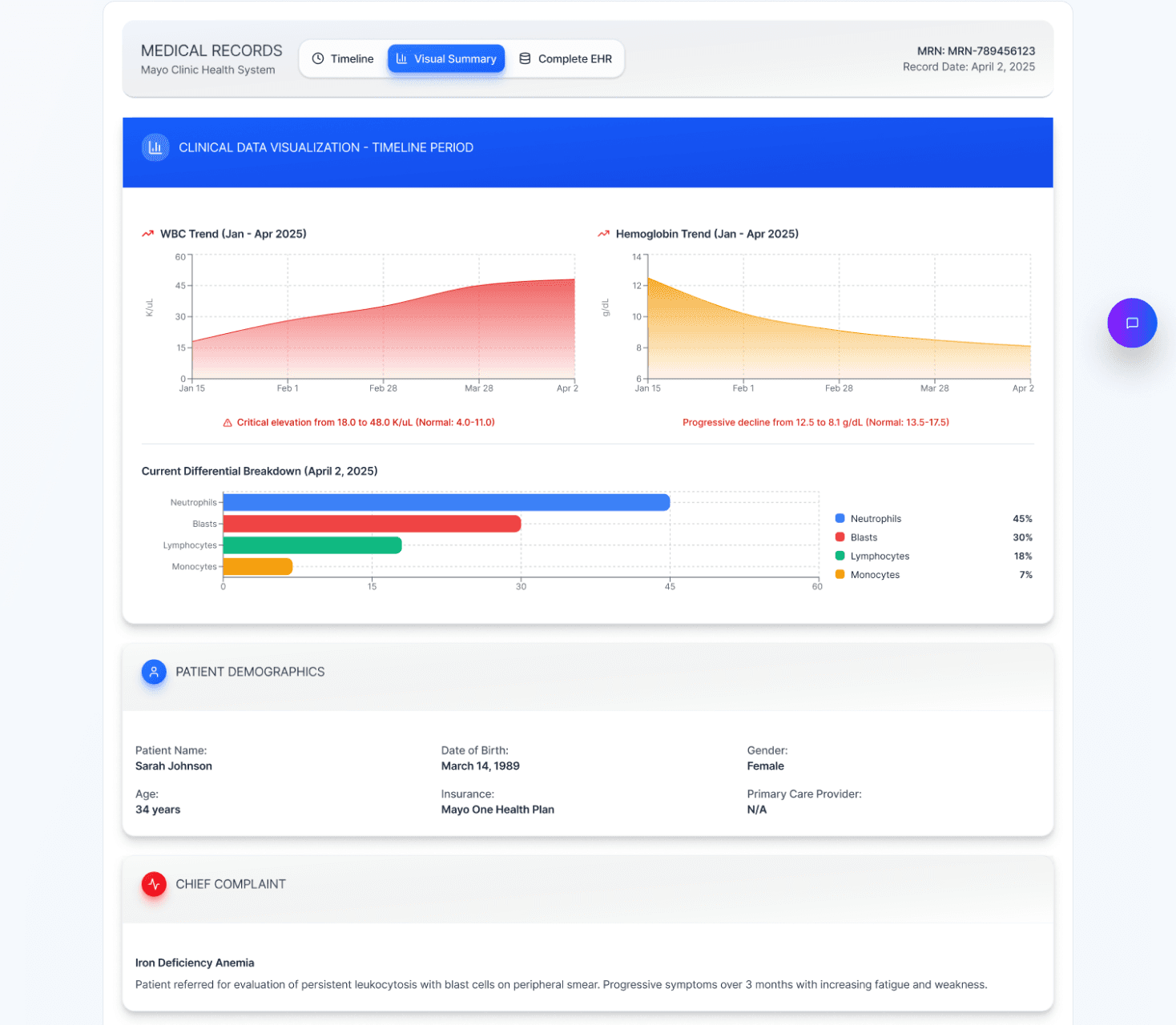

Visual EHR
Condenses condition-specific EHR data into focused charts and trends, enabling quick assessment of progression and abnormalities without scanning full records.
Detailed EHR View
Provides access to the full EHR in a familiar, structured format.
Allows clinicians to perform detailed review using the same process they are already accustomed to.


Integrated Messaging
Provides an email-like interface for internal team communication and patient outreach, keeping conversations organized and accessible.

AI Assistant
A patient-specific assistant that helps clinicians to get instant answers to key questions for that individual case, supporting faster, informed triage decisions.
My Report
Performance & Learning
Tracks speed, accuracy, and AI agreement to support continuous efficiency gains.
Operational Insights
Highlights volume, delays, and recurring issues to reduce workflow bottlenecks.
AI Transparency
Displays match rates, overrides, and confidence signals to guide system improvement.


Accessibility Standards
Designed with a WCAG AA–compliant color system supporting users with color vision deficiencies (~8% of males, ~0.5% of females).
Includes adaptive modes for Protanopia (red-blind), Deuteranopia (green-blind), Tritanopia (blue-blind), and Achromatopsia (no color), allowing users to personalize visibility.


Protanopic

Achromatopsia

Normal Vision

Deuteranopia & Tritanopia
Prototype
Result
30-40%
Faster triage process
40%
Reduction in time spent for patient information
3X
Faster identification of high-risk cases requiring immeadiate attention
12 - 18 min
Average time saved per referral review
Future Innovation and Growth Opportunities
This project deepened my understanding of how UX can support healthcare teams working under intense time and cognitive pressure. Observing physicians and triage nurses firsthand showed me that future clinical tools must reduce friction, not add complexity. It reinforced the value of human-in-the-loop AI: systems that save time, support decision-making, and keep clinicians accountable and in control.
Human-AI Collaboration
Continued research on optimal balance between AI assistance and human autonomy in high-stakes clinical decisions
Ethical AI Frameworks
Developing governance models for transparent, accountable AI in healthcare settings
Cross-Specialty Expansion
Adapting the triage framework for cardiology, oncology, and other specialties facing similar challenges
Product Video
Design Process
Research
Synthesis
Ideation
Design
Final Design
Reflection
01.Research
The Triage Burden:
Understanding Referral Workload, Time Pressure, and Clinical Risk
“I’m trained to make clinical decisions, but most days I’m just trying to keep up with referrals.”
Hematology Triage Nurse
We worked with 6+ hematology physicians and triage nurses through workflow observation, interviews, and surveys to understand how referral decisions happen under real clinical pressure. The research showed that the challenge was not lack of expertise, but sustained cognitive load: nurses process back-to-back referrals for hours, balancing speed, accuracy, and safety while trying not to miss critical clinical signals.
Qualitative Research
Observation and interviews showed that nurses often reach clinical reasoning only after navigating scattered records. In hematology triage, one missed signal could delay diagnosis or affect patient outcomes.
"By the time I'm ready to make a decision, I'm already mentally exhausted."
— Hematology Triage Nurse
"I want to think clinically, but most of my time is spent just getting to a point where I can."
— Hematology Triage Nurse
78%
of nurses described triage as mentally exhausting before clinical judgment begins
72%
reported high anxiety about missing critical information during referral review
67%
said decision confidence drops significantly later in long shifts
83%
expressed the need for clear, visual patient summaries before deciding
Quantitative Research
Surveys validated our interview findings, showing triage workflow inefficiencies around time, usability, and decision confidence. Clinicians wanted AI support, but only if it stayed transparent and kept them in control.
60–70%
of triage time is spent reviewing and assembling referral context not deciding
3–5 systems
accessed on average per referral during triage
82%
reported that contextual & visual patient timelines & EHR would significantly reduce triage effort
100%
agreed that AI must support, not approve clinical decisions
60–70%
of triage time is spent reviewing and assembling referral context not deciding
3–5 systems
accessed on average per referral during triage
82%
reported that contextual & visual patient timelines & EHR would significantly reduce triage effort
100%
agreed that AI must support, not approve clinical decisions
02.Synthesis
How might we save clinical time by designing a triage system that is fast, trusted, and easy to use?
What emerged was not clinical complexity, but fragmented systems. Clinicians were losing critical time across notes, labs, and history, showing the need for transparent AI support that brings context together while keeping decisions in their control.
Time Is the Bottleneck
Clinicians lose critical time searching across records before they can make triage decisions. The design needed to reduce navigation and bring key patient context into one place.
A System, Not Just a Tool
Triage depends on labs, notes, timelines, and handoffs. Clinicians needed a connected workflow that organizes information around decisions, not scattered screens.
Accountable AI Support
AI should assist, not decide. Clinicians needed clear summaries, visible supporting data, and easy control over every AI suggestion.
Time Is the Bottleneck
Clinicians lose critical time searching across records before they can make triage decisions. The design needed to reduce navigation and bring key patient context into one place.
A System, Not Just a Tool
Triage depends on labs, notes, timelines, and handoffs. Clinicians needed a connected workflow that organizes information around decisions, not scattered screens.
Accountable AI Support
AI should assist, not decide. Clinicians needed clear summaries, visible supporting data, and easy control over every AI suggestion.
Personas
This highlighted a core design challenge:
How might we reduce triage time by bringing efficiency and required clinical data together in one coherent system?
Hematology Triage Nurse
Handles first-pass triage for incoming referrals and determines urgency under time pressure.
"I spend most of my time finding labs and notes before I can even start thinking through the case."
Attending Hematologist
Reviews complex referrals while balancing clinic responsibilities and limited time.
"A lot of my time goes into piecing together charts instead of making the actual decision."
Triage Coordinator
Tracks referral status, lab completion, and follow-ups across patients and providers.
"The information is in the EHR, but I have to jump across tabs and reports to understand what's going on."
This highlighted a core design challenge:
How might we reduce triage time by bringing efficiency and required clinical data together in one coherent system?
03.Ideation
Using affinity mapping, concept mapping, and clinician discussions, I explored ways to reduce triage time while keeping decisions efficient and clinically sound.
Initial Concepts
• AI-assisted triage with priority and risk indicators
• AI summaries highlighting key referral findings
• Visual EHR data and patient timelines
These concepts focused on improving speed and clarity by organizing information around real hematology triage workflows.
User Flow
The user flow reduces search effort by bringing referrals, labs, history, and timelines into one clear triage sequence.
User Flow
The user flow reduces search effort by bringing referrals, labs, history, and timelines into one clear triage sequence.
04.Design
The design focused on reducing referral review time by organizing key triage signals into one clear view.
It centered on AI priority predictions, transparent decision factors, and visual timelines to help nurses understand context faster.
Branding and Style guide
High-fidelity screens focused on reducing cognitive load by bringing labs, referrals, history, and documentation into one clear triage workflow.
Initial Design
Dashboard
Triage Overview
Decision Flow
Timeline
EHR
Clinical Notes
User Testing
The initial testing consisted of 5 doctors and the ML researcher at Mayo Clinic.
Through observed usage, think-aloud walkthroughs, and post-testing interviews, key gaps in the triage flow surfaced, guiding improvements to clarity and efficiency in first-pass triage.
Triage Overview Density
The overview worked well for familiar users, but first-time users needed a simpler first view to focus faster.
Workflow Order
Clinicians naturally moved between related sections, showing the need to combine steps into one smoother flow.
Familiar Clinical Visuals
Charts already used in practice helped clinicians orient faster and reduced the learning curve.
Integrated Documentation
Adding notes within the triage overview supported more continuous, in-context decision-making.
05.Final Design
Login & Access
A clean, secure entry point enables clinicians to access the triage system quickly with minimal friction.
Triage Dashboard & Referral Queue
Centralized view of incoming referrals with status, priority, and last action at a glance.
Global search and filters support quick sorting and first-pass triage.
Contextual Tooltips
Used to explain key components, support different levels of technical familiarity, and improve accessibility without adding clutter.
Triage Overview & Decision Workspace
Primary workspace for reviewing patient context and making triage decisions.
Allows clinicians to accept or modify AI-assisted triage recommendations.
Keeps key clinical information visible to support quick, informed decisions.
Triage Actions - 4 Simple steps
Clinical Triage Guide -
Provides three quick-access views that allow clinicians to make fast triage decisions when detailed review is not required, supporting efficient first-pass triage.
Clinical Summary
Consolidates referral details, lab results, EHR data, and past medical history into a single, high-level overview.
Summary View Options - Allows clinicians to switch between focused views to review each summary area in more detail as needed.
Decision Flow
Aligns with the clinical decision charts nurses already use, showing the AI’s predicted outcome with confidence percentages and the key contributing signals (labs, trends, referral data) to support verification and trust.
Charts in use/AI Algos
Decision Flow
Patient Records Across Timeline, Visual EHR, and Detailed EHR
Patient Timeline
Displays the patient’s medical record over a selected time period in a chronological timeline.
Highlights laboratory tests, clinical visits, procedures, symptoms and diagnoses, and referrals in one continuous view.
Shows disease progression status to help clinicians quickly understand how the condition has evolved over time.
Visual EHR
Condenses condition-specific EHR data into focused charts and trends, enabling quick assessment of progression and abnormalities without scanning full records.
Detailed EHR View
Provides access to the full EHR in a familiar, structured format.
Allows clinicians to perform detailed review using the same process they are already accustomed to.
Integrated Messaging
Provides an email-like interface for internal team communication and patient outreach, keeping conversations organized and accessible.
Quick Patient Contact
Allows direct communication from the patient card with messages automatically recorded in the same thread for continuity and reference.
AI Assistant
A patient-specific assistant that helps clinicians to get instant answers to key questions for that individual case, supporting faster, informed triage decisions.
My Report
Performance & Learning
Tracks speed, accuracy, and AI agreement to support continuous efficiency gains.
Operational Insights
Highlights volume, delays, and recurring issues to reduce workflow bottlenecks.
AI Transparency
Displays match rates, overrides, and confidence signals to guide system improvement.
Accessibility Standards
Designed with a WCAG AA–compliant color system supporting users with color vision deficiencies (~8% of males, ~0.5% of females).
Includes adaptive modes for Protanopia (red-blind), Deuteranopia (green-blind), Tritanopia (blue-blind), and Achromatopsia (no color), allowing users to personalize visibility.
Protanopic
Achromatopsia
Normal Vision
Deuteranopia & Tritanopia
Prototype
Result
30-40%
Faster triage process
40%
Reduction in time spent for patient information
3X
Faster identification of high-risk cases requiring immeadiate attention
12 - 18 min
Average time saved per referral review
Future Innovation and Growth Opportunities
This project deepened my understanding of how UX can support healthcare teams working under intense time and cognitive pressure. Observing physicians and triage nurses firsthand showed me that future clinical tools must reduce friction, not add complexity. It reinforced the value of human-in-the-loop AI: systems that save time, support decision-making, and keep clinicians accountable and in control.
Human-AI Collaboration
Continued research on optimal balance between AI assistance and human autonomy in high-stakes clinical decisions
Ethical AI Frameworks
Developing governance models for transparent, accountable AI in healthcare settings
Cross-Specialty Expansion
Adapting the triage framework for cardiology, oncology, and other specialties facing similar challenges
Peoduct Video
Accessibility Standards
Designed with a WCAG AA–compliant color system supporting users with color vision deficiencies (~8% of males, ~0.5% of females).
Includes adaptive modes for Protanopia (red-blind), Deuteranopia (green-blind), Tritanopia (blue-blind), and Achromatopsia (no color), allowing users to personalize visibility.
Protanopic
Achromatopsia
Normal Vision
Deuteranopia & Tritanopia
Prototype
Result
30-40%
Faster triage process
40%
Reduction in time spent for patient information
3X
Faster identification of high-risk cases requiring immeadiate attention
12 - 18 min
Average time saved per referral review
Future Innovation and Growth Opportunities
This project deepened my understanding of how UX can support healthcare teams working under intense time and cognitive pressure. Observing physicians and triage nurses firsthand showed me that future clinical tools must reduce friction, not add complexity. It reinforced the value of human-in-the-loop AI: systems that save time, support decision-making, and keep clinicians accountable and in control.
Human-AI Collaboration
Continued research on optimal balance between AI assistance and human autonomy in high-stakes clinical decisions
Ethical AI Frameworks
Developing governance models for transparent, accountable AI in healthcare settings
Cross-Specialty Expansion
Adapting the triage framework for cardiology, oncology, and other specialties facing similar challenges
Peoduct Video


See more of my work
Smart Triage
Mayo Clinic
Healthcare UX, AI Decision Support, CX Research
AI triage workspace for faster referral decisions.
Built a unified clinical workspace that helps clinicians review referrals faster, safer, and with clearer context.
40% Faster , 12–18 Min Saved, 3× Faster Flagging
Homie.AI
Venture Build
AI Product Design, Learning UX
Real-time visual AI guidance for learning complex tools.
Designed a screen-aware learning assistant that reduces tutorial switching by bringing step-by-step, visual help directly into the user’s workflow.
Uni-Verse
Engagement
Engagement UX, Behavioral Design, UI Systems
Helping students find people, events, and belonging.
Designed a campus companion that connects students through Tag-Along, communities, live events, and real-time activity maps.
Best UX/UI Design Award · ASU GIT Fall 2025

See more of my work


